

November is the time when online promotions dominate – Black Friday, Cyber Monday, and increasingly, entire Black Weeks.
It’s the perfect opportunity to highlight your offers in Linkhouse, attract advertisers’ attention, and boost your sales.
With the special prices feature, you can set discounted rates for guest posts and link insertions in existing articles – and make the most of one of the busiest periods of the year.
When to activate your promotion?
To fully benefit from the Black Weeks campaign, we recommend keeping your promotions active from November 17 to December 5, 2025.
During this time, a dedicated tab – “Black Weeks Offers” – will appear in the Marketplace, giving your discounted offers increased visibility.
Please note: to have your offers featured in the Black Weeks Offers tab, your discount must be at least 25%, and the offer price must not have been increased within the last 30 days.
How to set up Black Weeks promotions in Linkhouse?
To make participation as simple as possible, we’ve introduced a ready-to-use Black Weeks promotion form with prefilled settings.
There’s no need to choose a template or configure everything manually – the form opens with all key fields already completed.
To activate your promotion:
- Go to Publisher → My Websites,
- Click the Set Promotions button – the form will open with default data.

By default, the form includes:
- Promotion name: Black Weeks Promotion
- Promotion period: November 17 – December 5, 2025
- Discount value: 30%
- Offer types: guest posts and link insertions
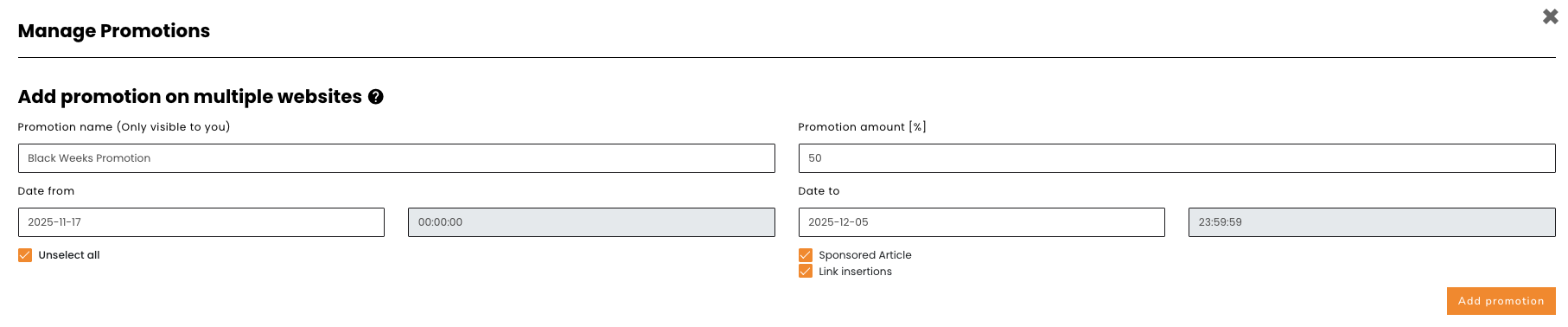 Of course, all fields can be freely modified – you can change the name, discount rate, dates, or the websites covered by the promotion.
Promotion for a single page
You can also set a promotion for a single page. To do this, go to My Websites, click Show all in Offers column, and click on the Promotional Prices icon next to the offer you want to promote:

The offer creation form is shorter in this case than when adding a promotion for multiple sites.

Regardless of how promotions are added, you can find them (and edit or delete them) by clicking the Set Promotions button under My Websites.
What happens after the promotion ends?
Discounted guest posts and link insertions can only be purchased during the promotion period (as defined by the Publisher), but can be implemented at any time.
In practice, this means that the Publisher will see the order only after the Advertiser submits the publication guidelines – which may happen even several weeks or months after the promotion ends.
After the Black Weeks campaign concludes – on Monday, December 7, 2025 – each Publisher will receive an email summary of all orders placed during the promotion.
This summary will include, among other things, the Order IDs, which will later appear in the panel once the Advertiser completes their guidelines.
This ensures that any orders appearing later (e.g., in January) were indeed purchased during the promotional period and that the reduced price is justified.
Have questions or sugesstions?
We’re open to feedback and ideas on how to help Publishers make the most of the Black Weeks campaign.
Feel free to reach out at [email protected].
You’re just one step away from joining the Black Weeks campaign.
Open your Publisher panel and launch your promotion with one click.